Ideas Genie on the Web
by ideasforgardens.com
This
site is dedicated entirely to users of Garden Software developed by
ideasforgardens.com
If
you DON’T already have a copy of our software, here’s the list:-
Ideas Genie- Software for Plant Lovers.
Click HERE to read about it and buy
your copy.
Home About us Ideas
for Gardens Cultivars Garden
Photos Garden Software Garden
Paintings
Amateur
Gardener Lessons
Lesson 1 - Restoring the Skeleton Database Issue date
8th March 2003
Click
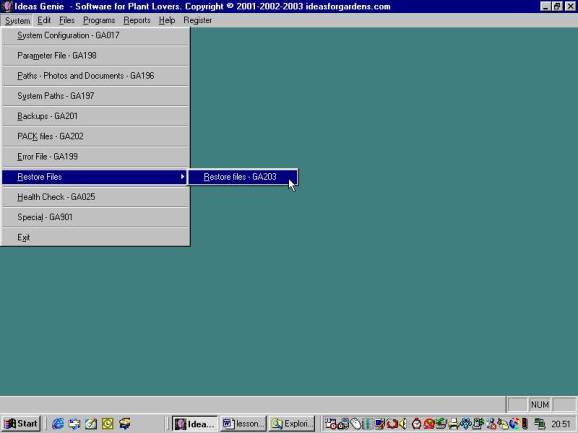
on the System tab on the Ideas Genie Menu, click on Restore Files then click on
“Restore Files-GA203” as shown below.
The
program will start. Now click on the “Do Test” button as shown below.
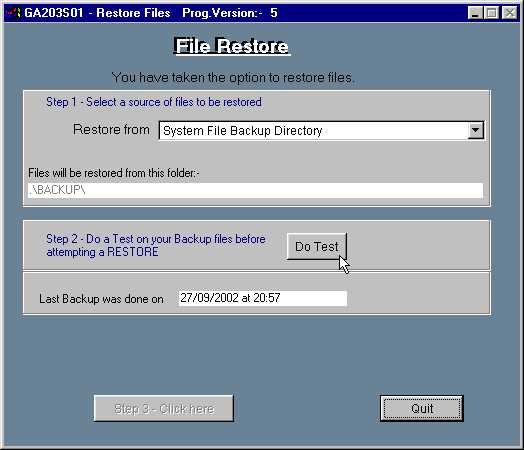
Ideas Genie does a test of the files in the System
File Backup Directory. (This is where the “Skeleton database” was loaded when
you installed Ideas Genie).
Wait until the file testing has been completed. If
all files are intact then the screen below appears.
Click on the “Step 3” button as shown.

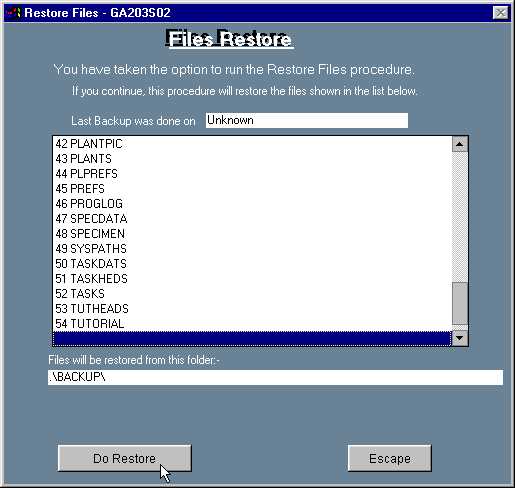
Screen GA203S02 appears as shown below. Click on the “Do Restore” button.
The “Mini database” will be restored.
Lesson complete!
Links:-
Home About us Ideas
for Gardens Cultivars Garden
Photos Garden Software Garden
Paintings